![Knowledge-base-logo-1.png]](https://support.flatratenow.net/hs-fs/hubfs/Knowledge-base-logo-1.png?height=40&name=Knowledge-base-logo-1.png)
Build Your Own Rules with ai Allie
Live Mid August
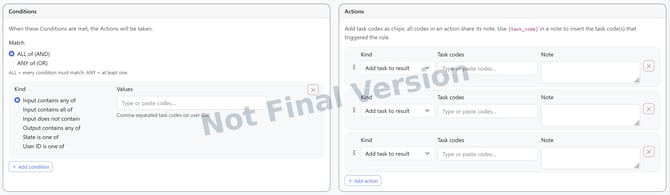
ai Allie already knows the AU and NZ Standards. Now you can teach Allie how your business quotes, so every quote that leaves your team follows the way you do things.
What are rules for?Every business has its own way of pricing a job. The minimum you'll walk out the door for, the tasks that always go together, the markup you never drop below. Until now, that knowledge lived in your head or your top estimator's head, and it went missing the moment someone new picked up the tablet.
Rules put that knowledge into ai Allie. Once a rule is set, ai Allie checks every quote against it and gives your team a nudge when something's off, so nothing slips through and every quote goes out the way you'd do it yourself.
What you can set a rule forYou'll be able to build rules around things like:
- Quote minimums — set a floor so no job gets quoted under what it's worth to turn up.
- Tasks that belong together — flag work that should always be quoted as a set, so the add-ons don't get forgotten.
- Pricing and markup guardrails — keep your margins where they need to be, even when someone's quoting in a hurry.
And more to come as the feature grows.
How you'll create your own rulesBuilding a rule is designed to be quick, no spreadsheets, no setup headaches:
- Log into the ai's configuration (will be live soon)
- Choose the Condition
- Example, if Task X, Y & Z appear on the quote
- Select the Action
- Example, then Add this task
- Click Save
Your rules stay yours. Allie uses them to guide your team, not to lock anyone out, so your crew still quotes fast, just with a safety net behind them.
Good to know- Rules work alongside the Standards Allie already follows, they don't replace them.
- You can set as many rules as your business needs.
- Change your mind? Update or switch off a rule any time.